Previous “Apple” posts

Well This Is Helpful

Back in March, I used my company’s blog to discuss some of the user hostile experiences Apple’s iWork suite was offering up. Apple recently unveiled an update to the software, and it fixed some of these issues. That’s very nice. Of course, there’s clearly still some work to be done.

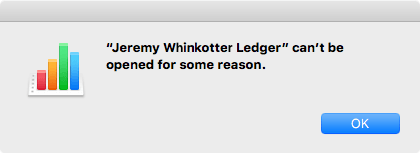
A dialog which reads: This document can't be opened for some reason.

Maybe it’s the phase of the moon, or perhaps my computer is infested with nanobots. Who knows? Not Numbers.app, and not me either!

Apple’s Upped Their Emoji Game ∞

Now, up yours.

If you’ve joined us in the future, please enjoy: 🖕. It’s been a long 16 month wait, but finally we can flip the emoji bird to our heart’s content.

(With apologies to Pat Paulsen.)

How Steve Jobs Fleeced Carly Fiorina ∞

Carly Fiorina is running for president, and one of the only things which vaguely qualifies her for the job is her time as CEO of HP. Unfortunately, her record there was incredibly poor, and this story from Steven Levy details just how badly she got bamboozled by Steve Jobs and Apple.

Yeah, Reporting on the Drone Strikes Is the Problem ∞

Josh Begley created an iOS app which tracks American drone strikes. Now Apple has removed it from their App Store (the sole legitimate means of distributing software to iOS devices), claiming it contains “excessively crude or objectionable content”.

Finally

It appears that when Apple ships iOS 9.1, iPhone users will have access to a key symbol of human communication. In a beta posted yesterday, Apple greatly expanded the number of supported emoji, including multiple new hand gestures. Of course, there’s one gesture that all have been waiting for, and it looks like we’ll be getting it at long last.

Apple's Middle Finger Emoji
Finally, it will be possible to flip someone off via emoji.

This new middle finger emoji was approved almost 15 months ago, as part of Unicode 7. However, Apple was slow to add it to their devices. After many impatient months, I went so far as to file a bug report with Apple on the matter. A few weeks later, however, that bug report was closed with a disappointed statement of “no plans to address this”. Worse, it soon became clear that Microsoft was taking the lead when it came to expressing one’s self via emoji. When this summer’s iOS 9 betas failed to include this important new glyph, I stewed for hours on end.

Today, however, I can breathe a sigh of relief.1 The bird is coming to our emoji. What a time to be alive! Have a look at a full gallery of the new emoji coming in iOS 9.1, which also include a taco, a burrito, an adorable little chipmunk, and much more. Then, sit through a few more weeks of anticipation until we finally get what we deserve!


Footnotes:

  1. As well as rejoice in the fact that I actually got a Radar (bug report) fixed, something fellow developers will know is all too rare. ↩︎

A Quick Trip to the Apple Store ∞

In baseball, players keep the physical balls used when they record certain personal achievements, like a batter’s first hit or a pitcher’s 1000th strikeout. When it’s a home run ball, teams will often negotiate with fans to retrieve the ball in question, offering up autographed memorabilia or tickets to future games in exchange for the ball in question. However, in the case of Brandon Moss’s recent 100th home run, his own bullpen caught the ball. Rather than letting him off easy and simply giving it to him, they’ve compiled a list of demands:

List of Demands
Bullpen catcher Ricky Pacione appears to have no idea how much an iPad costs

If nothing else, the bullpen has made things simple for Moss. If he really wants the ball, and he opts not to determine how to procure a 50 gallon drum of lube, he can do all his shopping in just one place.

Water Resistant-Ish

Today, we’re going to dive deep on the subject of the water resistance of the Apple Watch! Let’s begin with a brief discussion on nomenclature.

While the term is often used casually, most watches are not actually “waterproof” (generally, only high-end dive watches actually use this word in marketing). However, just about all wristwatches are “water-resistant” to some degree, with even cheap digital watches offering excellent water resistance. For most people, these watches are effectively waterproof. Standard use, including swimming, will have no ill effects.

Unfortunately, devices in the new category known as smartwatches have often lacked good water resistance, and the Apple Watch is definitely not a leader in this area. When Apple first unveiled the Apple Watch in 2014, they made no public mention whatsoever of its ability to withstand water. At the time, however, some reporters did receive a bit more information. The word from Apple was that “sweating, wearing it in the rain, washing your hands, or cooking with it are fine”, but you should “[t]ake it off before you swim or get in the shower”.

The next news came in February, when Apple CEO Tim Cook reportedly stated that he wears his Apple Watch even in the shower. Here’s a really mediocre French-to-English Google translation of the statement in question:

According to the report that is in us, the boss explained that Apple now always wore his watch “even in the shower.” Casually, it’s since Apple has never communicated info on the tolerance of his watch to water: rather dog or cat instead? It was just a visual on the site with a sporty wet arm but not swimming scenes.

I included this lousy translation (the report is where?) mostly because I really love the idea of measuring a watch as having “dog-like” or “cat-like” water-tolerance. It’s not at all precise, but it certainly is evocative.

Apple’s site was updated in March to include an official water-resistance rating, stating:

Apple Watch is splash and and water resistant but not waterproof. You can, for example, wear and use Apple Watch during exercise, in the rain, and while washing your hands, but submerging Apple Watch is not recommended. Apple Watch has a water resistance rating of IPX7 under IEC standard 60529. The leather bands are not water resistant.

Now, the IP Code is actually a bit tricky. That IPX7 rating means only that the device can handle immersion in up to 1 meter of water for 30 minutes. It doesn’t tell us anything about other types of water resistance. A footnote from the above-linked Wikipedia page leads to this page, which states:1

Ratings IPX7 and IPX8: Tests for the ratings IPX7 and IPX8 address the possibility of moisture ingress from submersion in water. For IPX7 testing, the sample is submerged for 30 minutes. The lowest point of the enclosure should be 1000 mm below the surface of the water, and the highest point at least 150 mm below the surface…Compliance with either of these tests does not imply compliance with IPX5 or IPX6 unless the product is marked with both ratings (for example, “IPX5/IPX7”). [Emphasis added]

Thus, an IPX7-rated device like the Apple Watch does not necessarily include any protection from water jets (IPX5, IPX6, IPX6K) like those found in a shower. It would seem odd for Apple’s CEO to admit to showering with his Apple Watch if the device can’t actually handle it though, right? Of course, Cook was never quoted as stating that the device survived the shower. Perhaps it’s all part of an evil strategy to trick customers into drowning their watches, forcing them to buy new ones.

On April 24th, the watch was finally released to the public. Due to myriad factors, including the direction of the Earth’s rotation, the placement of the so-called “International Date Line”, and—well look, it’s all very technical. Suffice it to say that Australians got the watch hours upon hours ahead of their jealous counterparts to the West. The young New Zealand lads at FoneFox did some stress testing, posting a video of the watch surviving the shower, a bucket of water, and even a swim in a pool.

Apple Watch in Pool
Apple Watch: Takes a(n extremely shallow) dive and still stays alive

The watch outperformed its IPX7 certification, and all previous announcements, both formal and informal. In fact, the Apple Watch performed so well that the FoneFox folks rewarded it by bashing it to death with a hammer. If you’re still waiting on your Apple Watch, you may wish to skip that video, but you should know that it took several strikes to break the watch. It turns out that much like yourself, a bit of water won’t kill the Apple Watch, but four blows right to the face probably will.

Nevertheless, between Apple’s CEO stating that he showers with the Apple Watch and the Kiwis stress-testing it, it would seem to offer good water resistance. And yet most recently, I stumbled upon the following, buried on page 137 of the 159 page Apple Watch User Guide:

Exposure to liquid Apple Watch is water resistant but not waterproof. You may, for example, wear and use Apple Watch during exercise (exposure to sweat is OK), in the rain, and while washing your hands. If water splashes on to the watch, wipe it off with a nonabrasive, lint-free cloth.

Submerging Apple Watch is not recommended. Apple Watch has a water resistance rating of IPX7 under IEC standard 60529…The following may affect the water resistance of Apple Watch and should be avoided:

  • Dropping Apple Watch or subjecting it to other impacts.

  • Submerging Apple Watch in water for long periods of time.

  • Swimming or bathing with Apple Watch.

  • Exposing Apple Watch to pressurized water or high velocity water, for example, showering, water skiing, wake boarding, surfing, jet skiing, and so on.2

  • Wearing Apple Watch in the sauna or steam room.

If nothing else, it would appear that Tim Cook is violating the recommendations of his own company’s user guide. Assuming he was accurately quoted by a French website describing a meeting Cook had with retail employees in Germany, anyhow. Regardless, there’s definitely some confusion as to just how water resistant the Apple Watch really is.

So it is that I, and you, arrive at the end of this post without any real conclusion. Real-world tests indicate that the Apple Watch is fairly rugged. It can certainly stand up to use while running and sweating, and it also seems capable of withstanding trips into the shower. Apple appears to be under-promising and over-delivering, which is better than the reverse. As well, given that the company certainly wants to avoid their brand new product acquiring a reputation for flakiness, they’d be foolish not to swap any water-damaged devices which succumbed under reasonable usage. All that is to say that while Apple should probably do a better job of explaining exactly what users can expect in the real-world, you probably don’t need to worry much.


Footnotes:

  1. At the time of writing, that page wouldn’t load, so the Internet Archive’s wonderful Wayback Machine was used to retrieve it. ↩︎

  2. It seems just a bit ridiculous for “showering” to be lumped together with “water skiing, wake boarding, surfing, (and) jet skiing”, no? ↩︎

New Emoji and My Favorite Radar

2014 was a big year for emoji. In the spring, Twitter implemented emoji on their website. In June, the emoji standard was extended to include around 250 new images. With the release of iOS 8 in the fall, Apple turned the emoji keyboard on by default. A great deal of progress was made.

After hearing about the new glyphs last summer, I took the opportunity to discuss the rise of emoji. You may recall my eagerness to see one particular new emoji added to the available options: “Reversed Hand With Middle Finger Extended”.

Reversed Hand With Middle Finger Extended
[Image credit: Emoji Blog]

But eight months later, those new emoji are very poorly supported. Apple has yet to update their platforms with any of the recently-added emoji, and each new version of Mac OS X and iOS has led only to repeated disappointment.

Recent news seemed to offer hope of a change. Hearing that Apple would be updating emoji on both their major platforms led to renewed optimism on my part. After reading a post touting “300 new, diverse emoji”, I felt sure that our glorious, obscene future had finally arrived. I updated a machine to the Mac OS X 10.10.3 beta to check it out.

There are some truly new emoji in the form of additional flags. Welcome, Belgium.

Face Massages
Now in alphabeticalish order!

There are also multiple pigments for many of the people emoji, so you can get a face massage in any skin tone you like:

Face Massages
That left-most yellow is intended to mean “cartoonishly unhuman”, not racist “Asian”.

However, after much searching I realized I was to be let down once again. None of the emoji from the updated Unicode 7 spec are included. Apple continues to flip us the figurative bird by refusing to provide us with a literal middle finger. Diversity of races is surely a good thing, but where is the diversity for people who wish to communicate with widely recognized hand gestures? We deserve satisfaction!

After some time sitting in a soggy pile of my own dashed hopes, I resolved to take action. Reasoning that perhaps Apple is simply unaware of the wondrous world of new emoji which awaits us all, I logged on to Apple’s Bug Reporter and filed an enhancement request.1

Radar #19925942
This is probably my favorite radar ever.

If you too dream of a future where we can use emoji to adequately express our contempt, add your support by duping Radar #19925942. Depending on your general feelings toward Apple and their bug reporting system, you may or may not choose to include an image of the desired emoji as I did. For reference, of course.

At times, I am haunted by the thought that Apple will never implement the new emoji. However, I have one fear even deeper than that, which I originally expressed on John Gruber’s “The Talk Show” last year2. My worry is that Apple may update their emoji set with most of the new glyphs, while opting to ignore the one fingered salute. For now though, I wait with bated breath and hope that the folks in Cupertino will do what’s right. C’mon guys — I really don’t want to have to switch to Android.


Footnotes:

  1. Using Safari® 1.0 or better, of course ↩︎

  2. For a non-timestamped, but more canonical link, see here. ↩︎

Not So User-Friendly

In the early 2000s, the Mac lacked a top-notch web browser. It shipped with a woefully-outdated version of Internet Explorer. This eventually led Apple to introduce their own web browser, Safari, in 2003. Throughout its history, Safari has featured a fairly detailed compass icon. Its current icon can be seen below:

The Old Safari Compass
Safari’s Current Icon

Apple is currently working on their next major operating system update, Mac OS X 10.10 (also known as “Yosemite”). As part of that update, Apple is changing the visual style of their app icons, including Safari. They’re toning down the realism, and going for a simplified appearance. Take a look:

A Comparison of the Contacts and Notes Icons
Old “Contacts” and “Notes” Icons on the Left; New Icons on the Right

The simplification generally works well. These new icons are still recognizable as representations of real-world objects, without unnecessary embellishments or detail. However, Safari’s new icon is somewhat problematic. Have a gander:

The New Safari Compass
Safari’s New Icon

If this existed in the real world, it would perhaps be the most frustrating compass ever made.

The MagSafe to MagSafe 2 Adapter

The Adapter
This is the MagSafe to MagSafe 2 adapter.

The Adapter, size comparison
This is the MagSafe to MagSafe 2 adapter, shown next to an oversized novelty quarter for size comparison.

The Adapter on its card
This is the MagSafe to MagSafe 2 adapter, attached to a piece of card stock, as it shipped.

The Adapter and its box
This is the MagSafe to MagSafe 2 adapter attached to a piece of card stock, along with the box it came in, and the booklets of information which accompanied it.

The Adapter, its box, and the card it rode in on.
This is the MagSafe to MagSafe 2 adapter attached to a piece of card stock, along with the box it came in, the booklets of information which accompanied it, and the piece of cardboard to which that box was attached (and to which a packing slip is still attached).

The Adapter, its box, the card it rode in on, and the box which contained it all.
This is the MagSafe to MagSafe 2 adapter attached to a piece of card stock, along with the box it came in, the booklets of information which accompanied it, the piece of cardboard to which that box was attached (and to which a packing slip is still attached), and the box in which all that arrived.

The AdapterFor the sake of completeness, this is the MagSafe to MagSafe 2 adapter attached to a piece of card stock, along with the box it came in, the booklets of information which accompanied it, the piece of cardboard to which that box was attached (and to which a packing slip is still attached), the box in which all that arrived, and the not-one-but-two missed delivery slips.


The Adapter
Not pictured: The kitchen sink